
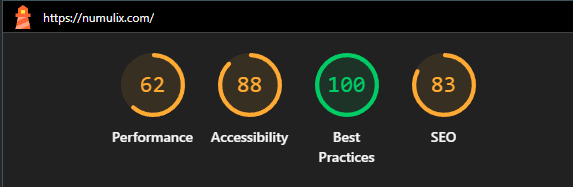
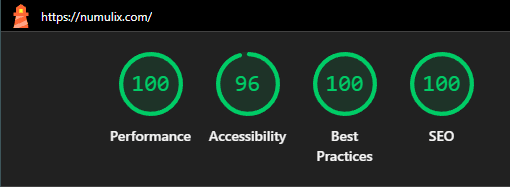
So, I took a look at my portfolio's stats and, not gonna lie, they kinda sucked. The Lighthouse scores were okay, but I knew they could be better. I wanted to see if I could get that perfect 100, but nothing is perfect in general. After a few tweaks, the glow up was real.
Here's the point on where I started.
And here's the final result:
Let's break it down how I did it.
Switching to PNPM and Angular SSR
First thing's first, I needed to tackle the biggest bottleneck: performance. This involved two major architectural changes.
First, I switched my package manager from NPM to PNPM. This was initially to solve a stubborn dependency conflict with Tailwind CSS v4. Apparently, Angular didn't like that I was using Tailwind v4 to the point that it was constantly complaining about the dependency. My initial thought was to force the command ng add @angular/ssr like I did when I initially scaffolded the project, but that did not work out the way I hoped for. I added an .npmrc file with the rule to ignore the missing dependencies, afterwards managing to finally add Angular SSR. With the addition of PNPM, it also came with the added benefit of faster and more efficient dependency management.
After configuring PNPM, I converted my application from CSR to SSR using ng add @angular/ssr. With CSR, the user would get a blank bage (with the header and footer only) while the browser downloads and run all the JavaScript. With SSR, the server sends a fully rendered HTML page, dramatically improving the First Contentful Paint (FCP) and Largest Contentful Paint (LCP) times. This single change was the most significant factor in boosting my performance score from 62 to 100. Unfortunately, I completely forgot to take screenshots of the FCP and LCP times to show you the significant improvement of the time.
Image optimization: The Quick Win
The portfolio features several images, which were initially in PNG format. These large files were slowing down my page load times. The solution was simple: I converted all of them to the modern WebP format.
WebP offers superior compression with minimal quality loss. This resulted in much smaller file sizes, which meant faster downloads and a snappier user experience. It was a low-effort, high-impact change that every developer should consider.
Fine Tuning: A11y and SEO
With performance maxed out, I turned to the remaining scores.
For accessibility, I went through my components and added appropriate ARIA attributes. This included adding aria-label to icon buttons and ensuring all interactive elements were keyboard-navigable. These small additions make a huge difference for users relying on screen readers.
For SEO, my application wasn't providing unique metadata for each page. I implemented dynamic page titles and meta descriptions using Angular's Title and Meta services. Now, each page has a unique, descriptive title and description, making my portfolio much more search engine friendly and pushing the SEO score to a perfect 100.
For my blog posts, I relied on the Title and Meta services to set the appropriate page title and description in the ngOnInit function.
ngOnInit(): void {
    const slug = this._route.snapshot.paramMap.get("slug");

    this._http.get(`/blog/${slug}.md`, { responseType: "text" })
        .subscribe(data => {
            const parsedContent: any = fm(data);
            this.postAttributes = parsedContent.attributes;
            this.postContent = parsedContent.body;

            this._titleService.setTitle(`Blog | ${this.postAttributes['title']}`)
            this._metaService.updateTag({
                name: 'summary',
                content: this.postAttributes['summary']
        })
    })
}
But for static pages, it would become bothersome to use these services for each page, so I had a different approach on handling page titles and the meta descriptions for the static pages:
// app.routes.ts

export const routes: Routes = [
    {
        path: '',
        loadComponent: () => import('./home/home.component').then(m => m.HomeComponent),
        data: {
            title: "Jovan Babić - Portfolio",
            description: 'Welcome to my portfolio, an average frontend enjoyer.'
        }
    },
    {
        path: 'blog',
        loadComponent: () => import('./blog/blog-list/blog-list.component').then(m => m.BlogListComponent),
        data: {
            title: "Jovan Babić - My Blog",
            description: "A collection of articles on my projects, tech, and more."
        }
    },
    {
        path: 'blog/:slug',
        loadComponent: () => import('./blog/blog-post/blog-post.component').then(m => m.BlogPostComponent),
    }
];

// app.component.ts

ngOnInit(): void {
    this._router.events.pipe(
        // We only care about NavigationEnd since it signifies
        // that the navigation has completed
        filter(event => event instanceof NavigationEnd),
        // Transform the stream and emit the root ActiveRoute instance
        map(() => this._activatedRoute),
        map(route => {
            // This is future-proofing for nested routes (e.g. /projects/project-example)
            while (route.firstChild) {
                route = route.firstChild;
            }

            return route;
        }),
        // Filtering the primary router-outlet (I'm only using the primary one,
        // better being safe than sorry)
        filter(route => route.outlet === 'primary'),
        // The data property in the routes is itself an Observable
        // If we used map, we would get an Observable of an Observable
        mergeMap(route => route.data)
    ).subscribe(event => {
        if (event['title']) {
            this._titleService.setTitle(event['title'])
        }

        if (event['description']) {
            this._metaService.updateTag({ name: 'description', content: event['description'] })
        }
    })
}